If you have a theriver.com email address and Outlook shows "The server you are connected to is using a security certificate that cannot be verified. The target principal name is incorrect" every time it opens, the fix is to change your incoming and outgoing server names to mail.everyone.net. Your mail, password and folders don't change.
Why it happens
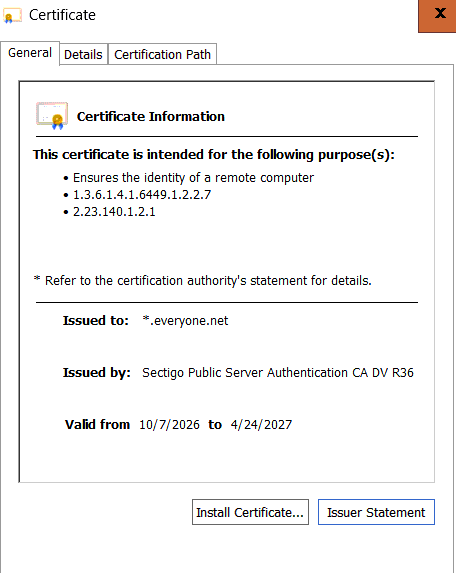
theriver.com email is hosted by Sitestar on Everyone.net's mail servers. Older setups point Outlook at a server name like mail.sitestar.com or mail.theriver.com. Those names still lead to the right server, but the server's security certificate is issued for *.everyone.net. Outlook sees that the name you asked for doesn't match the certificate, so it warns you, every time.
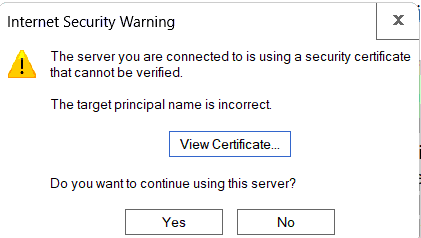
Click View Certificate and you'll see why. The certificate is issued to *.everyone.net, not to the name Outlook was told to use:
Clicking Yes works for that session, but the warning comes back, and training yourself to click past certificate warnings is a bad habit.
The fix
In Outlook, click File, choose your theriver.com address in the account list at the top, then go to Account Settings > Server Settings. Set:
- Incoming mail (IMAP):
mail.everyone.net, port 993, encryption SSL/TLS
- Incoming mail (POP3), if you use POP:
mail.everyone.net, port 995, encryption SSL/TLS
- Outgoing mail (SMTP):
mail.everyone.net, port 465 with SSL/TLS (or 587 with STARTTLS)
Server Settings shows only one side at a time: the incoming settings open first. Change the incoming server, then click Outgoing mail to switch to the outgoing settings and change that server too. It's easy to miss, and if you only change the incoming side, sending will keep using the old name.
Leave your username and password as they are. Click Next and Outlook will test the account. It should pass with no certificate prompt.
The same settings apply on a phone, Thunderbird or Apple Mail.
How to check whether you're affected
If you only see the warning occasionally, or it names a server you don't recognize, don't click Yes. Check your settings first, or ask someone. A certificate warning for an unexpected name can also mean something is intercepting your connection.
This is the kind of small fix we take care of as part of our managed IT service. If your email setup has collected a few years of old accounts and odd settings, our Microsoft 365 work is often the cleaner long-term move.
